Your Meta Ads dashboard reports 35 purchases. Google Analytics 4 shows 29. Meanwhile, your Shopify store confirms that 40 orders were placed.
So, which number is correct?
This is a common situation for businesses running digital advertising campaigns.
Different platforms use different attribution methods, but tracking limitations can also create reporting gaps. Browser restrictions, blocked scripts, incorrect event configurations, and missing conversion information can all affect measurement.
That's why businesses are increasingly comparing Server Side Tracking vs Browser Tracking when reviewing their advertising performance.
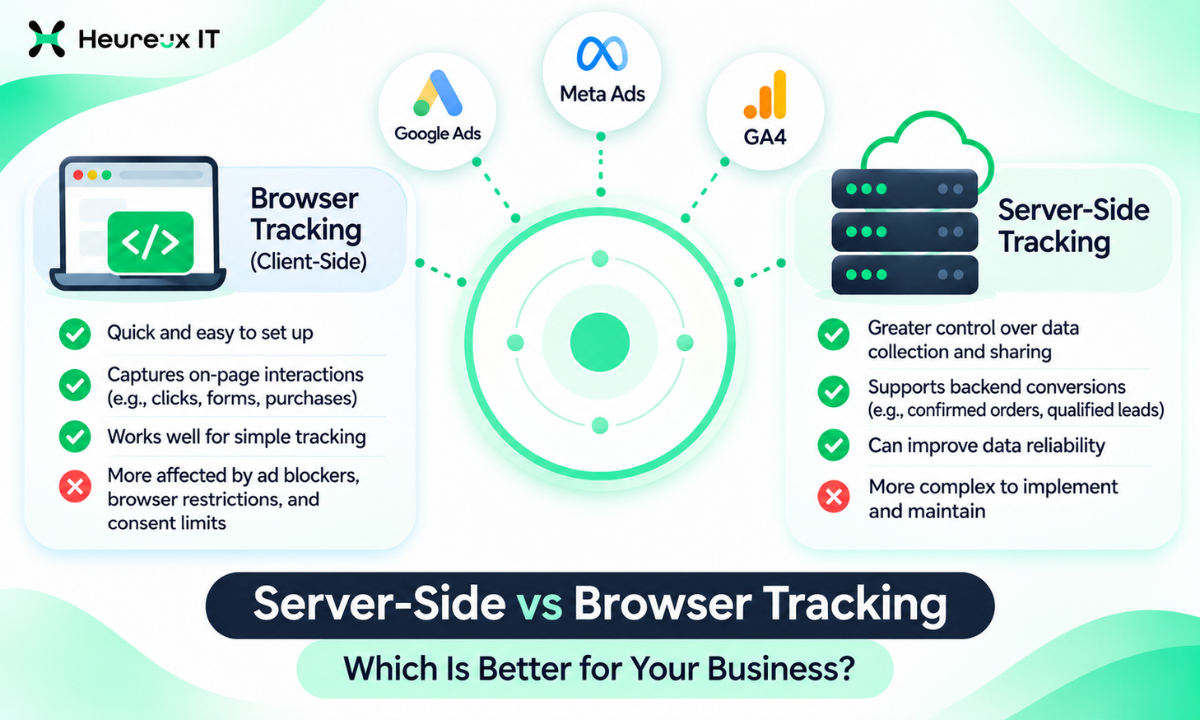
Browser tracking records website interactions through scripts running in a visitor's browser. Server-side tracking collects or processes event information through a server before sending it to analytics and advertising platforms.
Neither approach is perfect, and moving everything to a server doesn't automatically solve conversion tracking problems.
The most effective setup depends on your website, advertising goals, technical requirements, and the types of conversions you need to measure.
In this guide, we'll explain how both tracking methods work, where they differ, and how to decide which approach makes sense for your business.
What Is Browser Tracking?
Browser tracking, also known as client-side tracking, is a method of collecting website activity through JavaScript tags or pixels that run directly in a visitor's browser.
When someone visits a website, the browser loads the page and executes the configured tracking scripts.
These scripts can measure interactions such as page views, button clicks, form submissions, add-to-cart actions, and purchases.
Popular examples include Google tags, Meta Pixel, and other analytics scripts.
How Browser Tracking Works
Imagine someone clicks your Google Ads advertisement and visits your online store.
They browse a product page, add an item to the cart, and complete checkout.
With the appropriate tracking configuration, the browser sends information about these interactions to connected analytics and advertising platforms.
The basic process is:
Visitor Action → Browser Tracking Script → Advertising or Analytics Platform
For example, when a customer completes a purchase, a browser-based Google Ads conversion tag may send the purchase value, currency, and transaction information to Google.
The advertising platform then processes the eligible event according to its attribution and conversion-counting settings.
Benefits of Browser Tracking
Browser tracking is widely used because it is relatively simple to implement and maintain.
Many common website events can be configured through Google Tag Manager without developing a separate tracking server.
It also provides useful visibility into on-page behavior.
For example, you can measure how visitors navigate a website, which buttons they click, or whether they complete specific forms.
For small websites with straightforward measurement requirements, browser tracking may provide sufficient information.
Limitations of Browser Tracking
Browser tracking depends on code executing inside the visitor's browser.
This creates several possible limitations.
Ad blockers may block scripts or outgoing requests.
Browser privacy features can restrict cookies or other tracking mechanisms.
Visitors may decline tracking consent, and technical problems can prevent events from firing correctly.
Some events may also fail if a visitor leaves the website before a request completes.
These limitations can affect the information available to analytics and advertising platforms.
However, reporting differences aren't always caused by missing browser events. Attribution models, conversion windows, and counting rules also play a significant role.
What Is Server-Side Tracking?
Server-side tracking is a measurement method in which event information is processed or transmitted through server infrastructure rather than relying entirely on the visitor's browser.
The server acts as a controlled processing point between your business systems and selected analytics or advertising platforms.
Depending on the setup, data may originate from a website interaction, application backend, CRM, or eCommerce platform.
For example, an eCommerce backend can record a confirmed order and send an eligible purchase event through a server-side integration.
This helps businesses measure certain outcomes using their own operational systems.
How Server-Side Tracking Works
A common server-side tagging setup follows this process:
Visitor Action → Website Measurement Endpoint → Server Container → Analytics Platform
The website sends a supported event to a server endpoint.
The server processes the information and forwards the required parameters to approved destinations.
Alternatively, a backend system can send events directly to an advertising platform through an API.
These are related server-side approaches, but they aren't identical implementations.
What Can a Tracking Server Do?
A server-side measurement system can help businesses:
- Validate incoming event information.
- Apply approved data transformations.
- Remove unnecessary parameters.
- Route events to specific platforms.
- Apply consent-related controls.
- Monitor event delivery and errors.
- Send certain backend conversion events.
These capabilities provide greater control over how measurement information is handled.
But a server cannot automatically recover an interaction that was never observed, recorded, or permitted to be collected.
Server Side Tracking vs Browser Tracking: Key Differences
The main difference is where the measurement operations happen and how events reach their destinations.
| Feature | Browser Tracking | Server-Side Tracking |
|---|---|---|
| Data collection | Primarily browser scripts | Server endpoint or backend |
| Implementation | Usually simpler | More technical planning |
| Browser restrictions | More directly affected | Can reduce some dependencies |
| Data control | Distributed across browser tags | More centralized processing |
| Website speed | Browser executes tracking scripts | Some processing can move off-browser |
| Cost | Typically lower initial cost | Hosting or service costs may apply |
| Maintenance | Usually simpler | Requires server and integration monitoring |
| Backend conversions | Requires additional integration | Well suited to eligible backend events |
| Consent requirements | Must respect applicable rules | Must also respect applicable rules |
| Best application | Website interaction measurement | Controlled routing and complex conversion measurement |
Choosing between these methods requires more than comparing features.
A successful implementation also depends on accurate event definitions, proper testing, and reliable underlying business data.
Is Server-Side Tracking More Accurate Than Browser Tracking?
Server-side tracking can improve measurement reliability in certain situations, especially when businesses can use confirmed backend events or reduce dependence on specific browser-to-vendor requests.
However, there is no universal accuracy percentage that applies to every implementation.
Consider an online store with 100 completed orders.
Its backend system has records for those 100 purchases.
If browser tracking records fewer purchases because of technical problems, a properly configured backend integration may provide additional eligible purchase signals.
But it would be incorrect to assume that moving events to a server will always recover every missing conversion.
The system still needs accurate event information, suitable identifiers, proper consent handling, and successful delivery to the destination platform.
More Events Don't Always Mean Better Tracking
Suppose you implement Meta Conversions API alongside Meta Pixel.
After implementation, your Meta dashboard suddenly reports twice as many purchases.
That doesn't necessarily mean tracking has improved.
It may indicate that the same transactions are being counted twice.
The correct objective is to measure genuine business actions accurately, not simply increase the number displayed in an advertising dashboard.
How Browser Restrictions Affect Tracking
Modern browsers include privacy protections designed to limit certain tracking behaviors.
Safari, Firefox, and other browsers apply restrictions to various cookies and tracking techniques.
Some visitors also install extensions that block known advertising scripts and requests.
These controls can create limitations for browser-based measurement.
Server-side architecture can reduce dependence on some third-party requests by using controlled first-party endpoints or backend events.
However, a server-side GTM container may still rely on the browser to send the initial event.
If that request is blocked or never occurs, the server cannot automatically reconstruct it.
Server-side tracking is therefore not a universal way around browser privacy restrictions.
Does Server-Side Tracking Improve Website Speed?
It can, depending on the implementation.
Websites often include several scripts for advertising, analytics, customer behavior analysis, and remarketing.
These scripts can increase browser processing and network requests.
A server-side architecture may allow some measurement responsibilities to move away from the user's device.
This can reduce unnecessary browser-side activity in some configurations.
However, performance benefits are not automatic.
If all existing scripts remain installed, introducing a server container may not noticeably improve website speed.
The server itself must also operate reliably.
Before making changes, establish a performance baseline and compare actual results afterward.
Server-Side Tracking and Data Privacy
One potential advantage of server-side tracking is greater control over the information shared with third parties.
Instead of allowing numerous independent browser scripts to transmit information directly, a business can use a central processing layer to manage selected data flows.
For example, the server can remove unnecessary parameters before forwarding an approved event.
It can also apply configured consent rules.
But server-side tracking doesn't remove privacy obligations.
Businesses must still comply with applicable laws, platform requirements, and user choices.
Sending personal information through a server does not automatically make the processing compliant.
Similarly, hashing an email address does not necessarily make it anonymous.
A responsible measurement system should define what data is collected, why it is collected, which platforms receive it, and how user preferences are respected.
How Server-Side Google Tag Manager Works
Google Tag Manager provides two relevant container types: web containers and server containers.
A web container runs on the website and can observe supported browser events.
A server container operates in a server environment and processes incoming measurement requests.
With a compatible setup, selected website events can be sent to a server-side endpoint.
The server container receives the request and processes it through configured clients, triggers, and tags.
It can then forward relevant event information to approved destinations.
What Is the Benefit of Server-Side GTM?
Server-side GTM offers a central place for certain measurement operations.
Businesses can use it to standardize event handling, manage data transformations, and control routing between supported systems.
This can be especially useful when a website uses multiple advertising and analytics platforms.
However, implementing server-side GTM requires hosting, configuration, testing, and ongoing monitoring.
It also shouldn't be confused with sending all events directly from a business backend.
Some server-side GTM setups still begin with browser-generated events.
Which Tracking Method Is Better for Google Ads?
Google Ads advertisers depend on conversion information to measure results and support bidding strategies.
Common conversions include purchases, lead submissions, phone calls, and qualified business outcomes.
For straightforward website actions, properly configured browser conversion tags may be enough.
Businesses with more complex measurement requirements can evaluate additional approaches.
These may include enhanced conversions, offline conversion imports, or supported API and server-side integrations.
How Enhanced Conversions Work
Google Ads Enhanced Conversions can use appropriately collected first-party customer data to improve conversion matching.
Supported data, such as an email address, is normalized and hashed for matching through the applicable implementation.
Enhanced Conversions isn't the same thing as server-side GTM.
It can be implemented through supported website tagging or other approved methods.
Its value depends on the availability of appropriate data, accurate configuration, and Google Ads eligibility requirements.
What About Offline Conversion Tracking?
For lead generation businesses, a form submission may not be the final business outcome.
A customer might submit an inquiry today and purchase a service several weeks later.
If the business records that outcome in a CRM, eligible conversion information can potentially be connected back to Google Ads.
This can help advertisers evaluate qualified leads or completed sales rather than only counting initial inquiries.
The process requires correct identifiers, data handling, and attribution configuration.
Want help turning this into results for your business?
Explore our Google Ads services →Which Tracking Method Is Better for Meta Ads?
Businesses running Meta Ads commonly use Meta Pixel for browser-based website events.
Meta Conversions API, or CAPI, provides a server-to-server method for sending supported events.
These approaches can work together.
For example, a store may use the Pixel for permitted product interactions and a server-side integration for purchase events.
The important requirement is ensuring that corresponding browser and server events are identified correctly.
Why Event Deduplication Matters
When Meta receives two records describing the same purchase, it needs enough information to recognize that the events correspond.
Event names and matching event IDs are commonly used to support this process.
Suppose a customer completes one order.
The Pixel reports a Purchase event.
The backend also sends that Purchase through CAPI.
If both records are configured as corresponding events, Meta can use its supported deduplication process.
Without appropriate identifiers, duplicate reporting may occur.
Always test Pixel and CAPI together before relying on the reported results.
How Browser and Server-Side Tracking Work With GA4
Google Analytics 4 uses events to measure website and application interactions.
Typical website events may include page views, form submissions, and purchases.
Browser tagging is a common way to collect these events.
With server-side GTM, compatible requests can be routed through a server container.
The server can process the incoming events and forward them to GA4 according to the configuration.
Certain backend events can also be sent through supported measurement methods.
However, the GA4 measurement architecture should reflect the actual business requirements.
For example, a server cannot observe a visitor clicking a specific website button unless that interaction is captured and communicated to the measurement system.
The right setup may therefore combine browser and backend data sources.
Should You Use Browser and Server-Side Tracking Together?
For many businesses, combining the two approaches is practical.
A hybrid implementation can use browser tracking for website interactions and server-originated events for eligible business outcomes.
For example, an eCommerce business may measure add-to-cart interactions in the browser while also recording confirmed transactions through its backend.
A lead generation business may record a form submission through a browser tag and later send a qualified-lead outcome from its CRM.
This combination can provide additional measurement context.
However, it requires clear event definitions, consistent identifiers, appropriate consent handling, and deduplication.
Using two methods without proper coordination can create more problems than using one method correctly.
Server-Side Tracking for eCommerce Businesses
eCommerce websites often have multiple important conversion events.
These may include product views, add-to-cart actions, checkout initiation, purchases, and refunds.
Some events occur directly in the browser.
Others can be confirmed through backend records.
For example, a Shopify store maintains its own order records.
Those records are useful when validating purchase tracking.
If an advertising platform reports a different number of purchases, the merchant should investigate attribution rules, counting methods, and event delivery.
Server-side integrations can be particularly useful when the business needs reliable order-level information or connections with additional systems.
But the most important goal remains consistency between actual transactions and the data used for reporting.
Server-Side Tracking for Lead Generation Businesses
Lead generation presents different measurement challenges.
A form submission is often only the beginning of the customer journey.
The business may later qualify the lead, schedule an appointment, submit a proposal, or close a sale.
Browser tracking can record the initial website interaction.
A CRM integration can provide information about later business outcomes.
For example, a company may receive 50 leads from advertising, but only 15 become sales-qualified opportunities.
Sending eligible qualified-lead information through supported integrations can help advertisers evaluate campaigns more meaningfully.
This is particularly useful when advertising platforms would otherwise optimize only toward completed forms.
Common Tracking Mistakes Businesses Should Avoid
Counting the Same Conversion Twice
When browser and server events represent one action, they must be coordinated properly.
Incorrect deduplication can inflate reported performance.
Tracking the Wrong Business Goal
A business may focus on page views or form submissions when actual purchases or qualified leads matter more.
Choose conversion events based on real business outcomes.
Sending Incorrect Purchase Values
Wrong currency settings, repeated transactions, or inaccurate revenue parameters can distort advertising reports.
Validate purchase values against backend records.
Ignoring Consent Requirements
Browser and server-side tracking must respect applicable privacy requirements.
A technical integration shouldn't override user preferences.
Assuming Every Platform Will Show Identical Numbers
Google Ads, Meta Ads, and GA4 have different attribution and conversion-counting systems.
Even correctly configured tracking may produce different platform reports.
The goal is accurate underlying events and a clear understanding of reporting differences.
How to Decide Which Tracking Setup Your Business Needs
Start by reviewing your current setup rather than immediately replacing it.
Identify the conversions that matter most.
Then examine how those conversions are recorded.
For example, an online store should verify purchase events against its actual order records.
A lead generation company should review whether form submissions are captured reliably and whether qualified outcomes can be measured.
Next, examine your current tracking limitations.
Are events missing because of incorrect triggers?
Do you have duplicate conversions?
Are purchase values inconsistent?
Do you need CRM or backend integrations?
These questions help determine whether server-side infrastructure would provide meaningful value.
When Browser Tracking May Be Enough
Browser tracking may be suitable when your measurement requirements are straightforward, important events are configured correctly, and additional server infrastructure offers limited practical value.
When Server-Side Tracking May Help
Server-side tracking may be worthwhile when you need controlled data routing, backend conversion events, complex integrations, or improvements to specific measurement gaps.
When a Hybrid Setup Makes Sense
A hybrid setup can be useful when browser interactions and backend outcomes both contribute important information.
The decision should account for implementation complexity, maintenance costs, event accuracy, and the business value of additional measurement.
How Heureux IT Helps Businesses Improve Conversion Tracking
At Heureux IT, we help businesses understand how Conversion Tracking supports their advertising and analytics systems.
Our approach focuses on identifying important events, reviewing tracking configuration, and improving the quality of data available for marketing decisions.
This includes working with Google Tag Manager, Google Analytics 4, Google Ads, Meta Ads, and relevant website integrations.
For businesses considering server-side tracking, the first step is evaluating the existing measurement setup.
A proper review helps identify whether problems come from missing events, duplicate conversions, incorrect values, or limitations in the current tracking architecture.
From there, businesses can choose a browser-based, server-side, or hybrid solution that matches their requirements.
The objective is not simply to report more conversions.
It's to create a reliable foundation for evaluating campaign performance and business results.
Final Thoughts
Choosing between Server Side Tracking vs Browser Tracking depends on what your business needs to measure and how reliably the information is currently collected.
Browser tracking remains useful for measuring website interactions and implementing common advertising tags.
Server-side tracking offers additional control over data processing and can support backend conversion information.
However, neither approach guarantees complete data collection or automatically resolves attribution differences.
For many advertisers, a properly configured hybrid measurement system provides a practical balance.
Before investing in additional tracking infrastructure, verify your existing events, review business records, and identify the measurement improvements that matter most.
At Heureux IT, we help businesses strengthen their conversion measurement through GA4, Google Tag Manager, Google Ads, and Meta tracking integrations.
A reliable tracking foundation supports clearer reporting and better-informed advertising decisions.
Frequently Asked Questions
What Is the Difference Between Server-Side Tracking and Browser Tracking? +
Browser tracking uses scripts running in a visitor's browser to collect and send events. Server-side tracking processes or sends measurement data through server infrastructure. The main difference is where tracking operations occur and how information reaches analytics platforms.
Is Server-Side Tracking Better Than Browser Tracking? +
Not in every situation. Server-side tracking provides more control over certain data flows and can support backend events. Browser tracking is often easier to implement and remains useful for website interactions.
Does Server-Side Tracking Improve Google Ads Conversion Tracking? +
It can support more reliable measurement in some cases, particularly when combined with eligible first-party data or backend conversion sources. However, results depend on configuration, data quality, and the measurement method used.
What Is Meta Conversions API? +
Meta Conversions API is a server-to-server integration that allows businesses to send supported conversion events to Meta. It can complement Meta Pixel when events are properly configured and deduplicated.
Can Server-Side Tracking Work With GA4? +
Yes. Compatible GA4 measurement requests can be processed through server-side Google Tag Manager, and certain backend events can be sent through supported methods. Some website interactions still require browser-based event collection.
Does Server-Side Tracking Replace Browser Tracking? +
Not necessarily. Many businesses use both methods to combine website interaction events with approved server-originated conversion information.
Is Server-Side Tracking More Accurate? +
It can improve reliability in specific implementations, but accuracy is not guaranteed. Correct event triggers, identifiers, consent handling, and deduplication remain essential.
Does Server-Side Tracking Bypass Cookie Consent? +
No. Server-side tracking must respect applicable privacy laws, consent requirements, and user choices. Moving tracking operations to a server does not remove those obligations.
Is Server-Side Tracking Expensive? +
It can cost more than basic browser tracking because server hosting, managed services, configuration, and maintenance may be required. Costs depend on the chosen setup and traffic volume.
Which Tracking Method Is Best for eCommerce and Lead Generation? +
It depends on the business. eCommerce stores often benefit from connecting purchase events with confirmed order data, while lead generation companies may benefit from CRM conversion outcomes. A hybrid setup can support both browser interactions and backend measurement.
Heureux IT is a digital marketing agency specialising in Google Ads, Meta Ads and SEO. We help growing businesses turn paid and organic search into measurable revenue.